
Focus on digital signage,touch screen,interactive kiosk,outdoor kiosk.
NO PROJECT IS TOO SMALL FOR OUR EXPERTISE
NO PROJECT IS TOO SMALL FOR OUR EXPERTISE
Let’s be honest for a second: the "standard" checkout counter is dying. If you’re running a chain of burger shops, a busy bookstore, or managing a massive shopping mall, you’ve felt the sting. You can’t find enough staff, the staff you dohave are burnt out, and customers—bless them—are losing their patience with 10-minute wait times.
The fix isn't just hiring more people; it’s changing the game. This is why the Self-service POS kiosk has moved from a "nice-to-have" luxury to an absolute "must-have" for 2025. In this guide, we’re going to look at the top solutions hitting the market and how a well-placed Self Service Kiosk can actually pay for itself faster than you think.
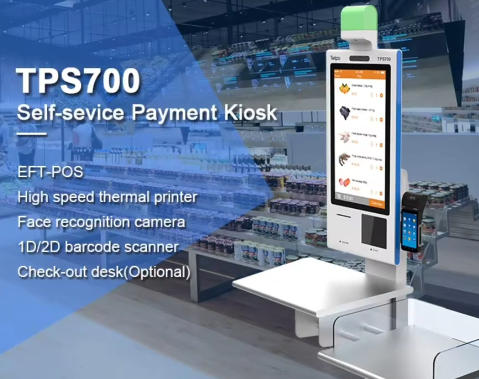
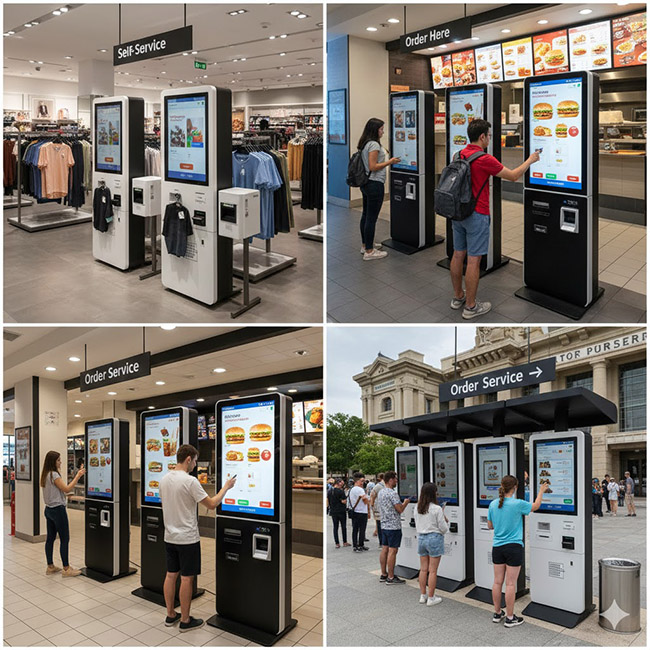
If you walk into a McDonald's or a high-end apparel store today, you’ll see it. People wantto control their own transaction. There’s something about a touchscreen ordering kiosk that feels less pressured.
The biggest headache for B2B owners in 2024 and 2025 is labor. Minimum wages are climbing, and turnover is high. A Self-service POS kiosk doesn't call in sick. It doesn't need a coffee break. It stands there, ready to take orders 24/7. For a chain of coffee shops or bakeries, replacing just one cashier shift with a kiosk can save thousands of dollars in a single quarter.
In the world of SEO and modern retail, "friction" is the enemy. Every second a customer spends waiting is a second they spend thinking about leaving. Self Service Kiosks eliminate that friction. They offer a "straight-to-the-point" experience that modern shoppers crave.
Let's break down the actual "on-the-ground" problems that a Self-service POS kiosk fixes. It’s not just about taking money; it’s about workflow.
For Chain Burger Joints & Quick Service Restaurants (QSR)
The classic problem: "I said NO onions!"
Human error is real, especially during a lunch rush. When a customer uses an interactive ordering kiosk , they see exactly what they are getting.
Upselling is Automatic: A kiosk never forgets to ask, "Would you like to make that a meal for $1.50?" or "Add a brownie?" Statistics show that Self Service Kiosks increase average order value (AOV) by 15-30% simply because they never get tired of upselling.
Malls have massive floor space but often have "dead zones" far from the main food court. Placing a freestanding self-service kiosk for gift cards, parking payments, or even basic wayfinding with a payment gateway turns every corner of the mall into a revenue generator.
For Specialized Retail (Star Merchandise, Apparel, Shoes)
Ever lost a sale because you didn't have a size 10 shoe in stock? With an "Endless Aisle" kiosk , the customer can scan the item, see it's in the warehouse, pay on the spot, and have it shipped to their house. You just turned a "walk-out" into a confirmed sale.
If you're out there looking to buy, the options are overwhelming. Here is a curated list of the top categories and models that are actually delivering ROI this year.
Rank | Model Category | Best For | Standout Feature
1. The "Ultra-Slim" Countertop | Cafes & Bakeries | Space-saving, high-speed NFC
2. The "Double-Sided" Pedestal | Large Malls | Serves two customers at once
3. The "Ruggedized" QSR | Burger Chains | Grease-proof, easy-clean screen
4. The "Endless Aisle" Wall-Mount | Shoe & Apparel Stores | Integrated barcode scanner
5. The "Outdoor-Ready" Kiosk | Attractions & Parks | High-brightness, weatherproof
6. The "Cash-In/Cash-Out" Hybrid | Traditional Retail | Accepts both card and cash
7. The "Tablet-Style" Mini | Boutique Bookstores | Low-cost, easy Android setup
8. The "Wayfinder" Payment Hub | Shopping Centers | Large 43" screen, map + POS
9. The "AI-Voice" Assistant | Drive-thrus | Voice-to-text ordering
10. The "LCD KIOSK" Station | Pop-up Shops | Battery-powered, 5G connected
4. Scenario Guide: How Different Industries Use Kiosks
In a coffee shop, the morning rush is make-or-break. A Self-service POS kiosk allows regulars to "grab and go." They tap their pre-saved order, pay with their phone, and wait for their name to be called. It keeps the line moving and keeps the baristas focused on making high-quality drinks instead of fumbling with change.
If you’re managing a landmark or a museum, you know the "ticket window" line is a nightmare. A cluster of Self Service Kiosks at the entrance can handle 80% of ticket sales. You can even include a "photo-print" option where guests pay a few bucks more to have their souvenir photo printed right there.
Clothing & Shoe Stores
Retail is all about the "experience" now. Customers use interactive retail kiosks to check prices, find matching outfits (AI-driven "complete the look"), or join loyalty programs without having to talk to a salesperson who might be busy in the fitting room.
I’ve seen too many B2B owners buy a "cheap" kiosk from a random site only for it to break down in a month. If you want a real Self-service POS kiosk that lasts, look for these three things:
In a shopping mall or a bright cafe, a low-quality screen looks like a mirror. You need at least 500 nits for indoor and 1500+ for window-facing units. The touch technology should be "Capacitive" (like your iPhone), not "Resistive" (the old squishy screens).
This is the big one. Your unattended payment kiosk must be PCI-DSS compliant and EMV Level 1 & 2 certified. If it’s not, you are on the hook for any fraud. Always ask the vendor for their certification papers.
Can you swap out the thermal paper in 10 seconds? Does the front panel open easily for repairs? In a chain environment, you can’t afford to have a technician visit every time a receipt jams.
Let's look at a real-world example. A mid-sized burger chain with 20 locations was struggling with rising labor costs in California. They installed two Self Service Kiosks per location.
The Investment: Roughly $5,000 per unit (including software).
The Result: Wait times dropped by 3 minutes on average.
Average order value rose by $2.20 because the kiosk always suggested a "side and drink combo."
They were able to move one cashier to the kitchen, speeding up food prep.
The ROI: Within 7 months, the increased sales and labor savings covered the cost of the hardware. That’s a massive win.
The hidden benefit of the Self-service POS kiosk is the data. When a customer uses a kiosk, you see exactly how they navigate your menu.
Do they look at the desserts and then click away? Maybe your prices are too high.
Do they always add extra cheese? Maybe you should make that a default option.
This kind of self-service analytics is something a human cashier simply can't track accurately. By analyzing the "click-path," chain owners can optimize their menus for maximum profit.
Anyway, enough of the technical jargon. If you're a business owner, you just want to know: Is this going to make my life easier?Yes, it is. But only if you do it right. Don't just stick a kiosk in a dark corner and hope people use it. You need scene guidance . Use floor stickers, bright "Order Here" signs, and have your staff encourage people to try it. "Hey, you can skip the line if you use the kiosk right there!" is the most powerful marketing tool you have.
The bottom line is that the Self-service POS kiosk is the bridge between the physical and digital worlds. It gives your store the "speed of the internet" with the "touch and feel" of a real shop.
Q: Are kiosks hard to integrate with my current POS?
A: Not anymore. Most modern Self Service Kiosks run on Android or Windows and have "plug-and-play" integrations for major POS systems like Square, Toast, or Revel.
Q: Do customers actually like using them?
A: Millennials and Gen Z? 100%. They prefer it. Older generations are getting used to it too, as long as the UI (User Interface) is clean and the buttons are big.
Q: What about the "Personal Touch"?
A: Taking someone's credit card and saying "Next!" isn't a personal touch. By letting the kiosk handle the money, your staff can actually smile, make eye contact, and deliver the food with a genuine "Have a great day!" That’s where the real service happens.
The data is clear. The Self-service POS kiosk market is growing because it works. It solves the labor crunch, it makes you more money per order, and it makes your customers' lives easier.
If you are a chain owner or a venue manager, your goal for 2025 should be to identify the "bottlenecks" in your checkout process. If people are standing in line for more than 3 minutes, you’re losing money.
Start small. Test a couple of Self Service Kiosks in your busiest locations. Watch the data. Once you see that AOV climb, you’ll wonder why you didn't do this years ago.
Ready to take the next step? Would you like me to find specific vendors for Self-service POS kiosks in your region?
Should we draft a "Kiosk Readiness Checklist" for your managers?
Do you need a deeper dive into the software security side of things?
The future of retail is unattended, interactive, and incredibly profitable. Don't get left behind.
Current article link: https://www.lcdkiosk.com/news/1494.html
Tel
